


what's available
features overview
GatherThat is rich in features built around four primary areas: Collect, Manage, Share, and Explore.
GatherThat users can create public, shareable versions of their collections so that the entire world can explore what they collect. Check out some of those below. Browse, search for keywords, filter by collection focus or theme, and explore the collections of people who share their interests around the world.
Collect
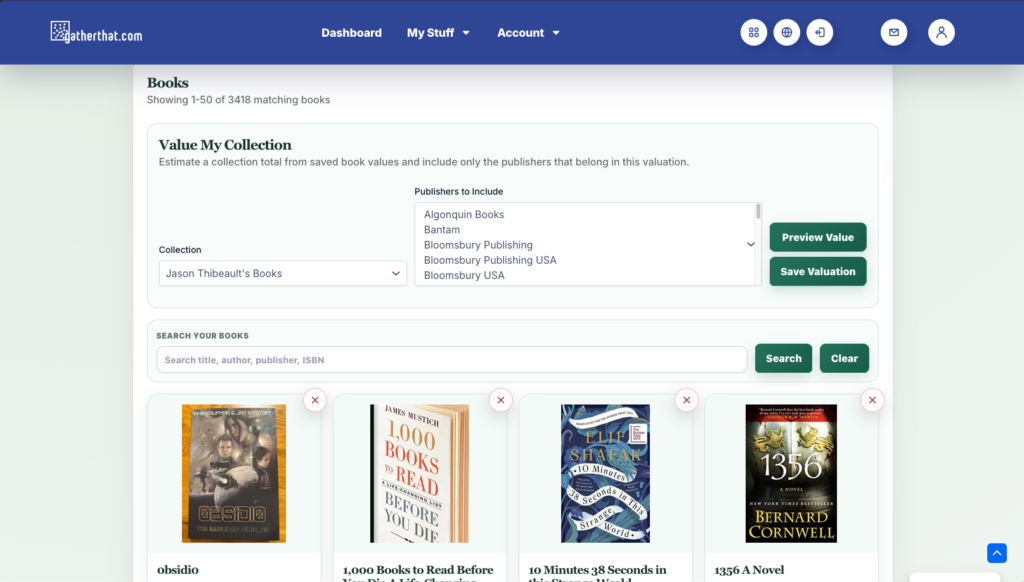
Whether you are into books, whiskey, trading cards, or art, GatherThat can help you collect. With eBay integrations, wishlists, and a built-in system to make offers on other user’s collectibles (when they are “Open to Offers”), you’ll be able to fine tune your collection to exactly how you want it. And, with a powerful mobile app that includes a barcode scanner (for supported collectibles like books, comics, and movies), you’ll be able to collect-on-the-go.
Some of the Collect features include:
Collection management
Organize your collections, add and update supported collectibles, and import existing records. Use purpose-built collection types, custom types where your plan allows, and personal tags to keep the details and connections that matter to you.
Sale Listing
Make collection items available for offers, discover items accepting offers, negotiate with other collectors, and record sold items.
Subscription Tracking
Track book publisher subscriptions, upcoming releases, orders, and skips, with connected email workflows, a pre-order calendar, and reminders.
Manage
GatherThat includes powerful collection management features, allowing you to quickly and easily organize, categorize, tag, and display your collectibles. You can even create new collections which include collectibles from different categories, allowing you to showcase exactly what you want.
Some of the Manage features include:
Collection management
Organize your collections, add and update supported collectibles, and import existing records. Use purpose-built collection types, custom types where your plan allows, and personal tags to keep the details and connections that matter to you.
Collection valuation
Record item and collection values, use automated estimates and market comparisons, track value changes, and prepare insurance reports.
Ratings and Reviews
Rate and review supported collectibles, manage publication settings, and choose which opinions to share with other collectors. Review fields and available tools depend on the collectible type.
Subscription Tracking
Track book publisher subscriptions, upcoming releases, orders, and skips, with connected email workflows, a pre-order calendar, and reminders.
Insurance Reports
Prepare a report of your collection and recorded item values for your insurance documentation. Available with Archivist.
Share
We understand that collecting is also about sharing. You want to show the world what you have, what you’ve assembled, and how it’s all connected. That’s why GatherThat includes a host of features including making your collections public (with a unique URL), adding GatherThat friends, and even inviting others to help you manage your collection.
Some of the Share features include:
Public collector profile
Introduce yourself as a collector with a public profile, social links, and selected collection highlights. Choose the collection content visitors can browse.
Friends
Keep in touch with collector friends and access your friends list from the dashboard.
Sale Listing
Make collection items available for offers, discover items accepting offers, negotiate with other collectors, and record sold items.
Ratings and Reviews
Rate and review supported collectibles, manage publication settings, and choose which opinions to share with other collectors. Review fields and available tools depend on the collectible type.
Explore
You don’t have to be a GatherThat user to explore the many collections, and collectors, that have been shared. Whether through a web browser or the GatherThat mobile app, you can browse the many different types of collections and collectibles, save them as favorites, and follow them as they change over time.
Some of the Explore features include:
Public collector profile
Introduce yourself as a collector with a public profile, social links, and selected collection highlights. Choose the collection content visitors can browse.
Sale Listing
Make collection items available for offers, discover items accepting offers, negotiate with other collectors, and record sold items.
your collection types
collection studio
Build your own collection types, from Funko Pop to Beanie Babies, and share your templates for other collectors to use.
The Collection Studio is the engine behind GatherThat made available to you! That’s right, the same tools we use to create collection types like Books, Movies, and Comics, you can use to build whatever collection type you want. And, what’s more, you can share those collection types with every GatherThat user so that you can build a community around your collectibles.
Collection Studio: Create Custom Types
Design your own collection types and custom fields.
Publish and Share Collection Templates
Publish a template version for other collectors to discover.
Discover and Adopt Collection Templates
Adopt an independent copy of another collector’s shared template.
Upgrade Collection Template Versions
Review and apply compatible template upgrades explicitly.
Manage Custom Collection Items
Create and edit custom item values within an owned collection.